Tag: technology

  • Follow-Up Blog Post: Refining Production Architecture Through Real Implementation

    Follow-Up Blog Post: Refining Production Architecture Through Real Implementation

    A Solutions Architect’s Deep Dive into Component-Based Design, Cloud Integration, and the Reality of “Minimal but Resilient”


    The Evolution: From Minimal Vision to Layered Reality

    The original post captured the aspiration: balance “small” with “production-grade.” Six months and several architectural refinements later, I can now articulate what that balance actually looks like when you’re knee-deep in real implementation decisions.

    Voice Recorder Pro hasn’t grown in scope — it’s grown in thoughtfulness. That distinction matters, because it separates a polished MVP from a fragile one that looks polished until it doesn’t.


    Technical Insights from Implementation Reality

    1. Component-Based Architecture Beats Monolithic “Simplicity”

    What Changed:
    Initially, the Drive integration lived as part of a larger manager class. As we added storage quota retrieval, file operations, and authentication state management, that “simple” monolith became a pressure cooker for side effects.

    The Refactor:
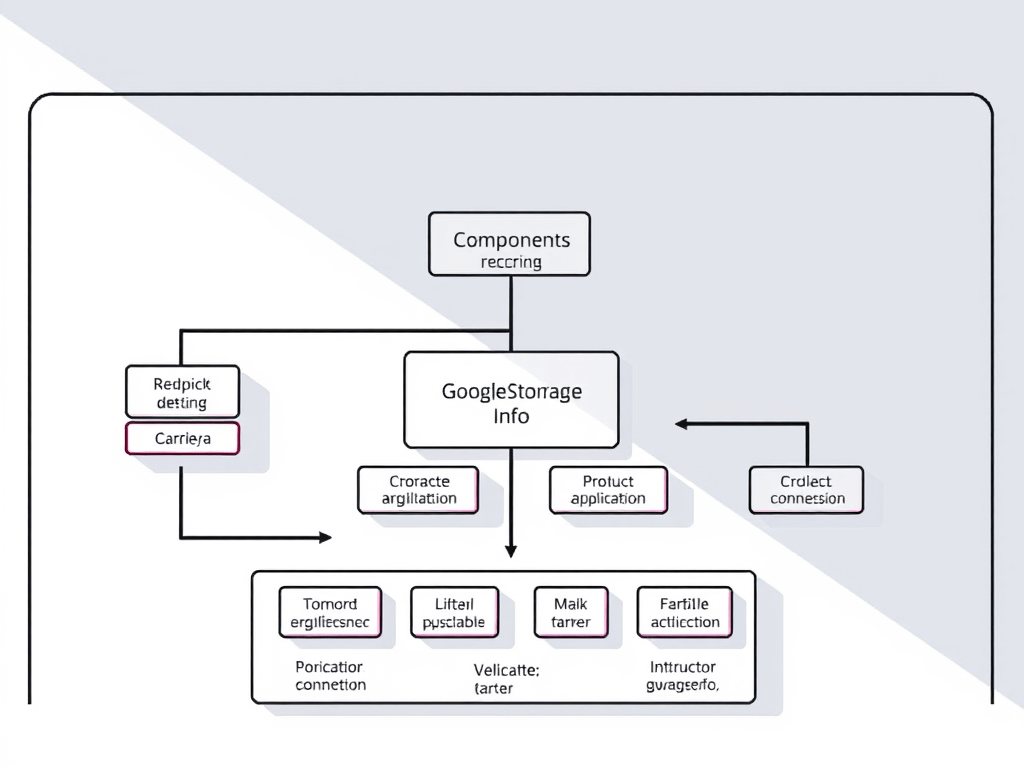
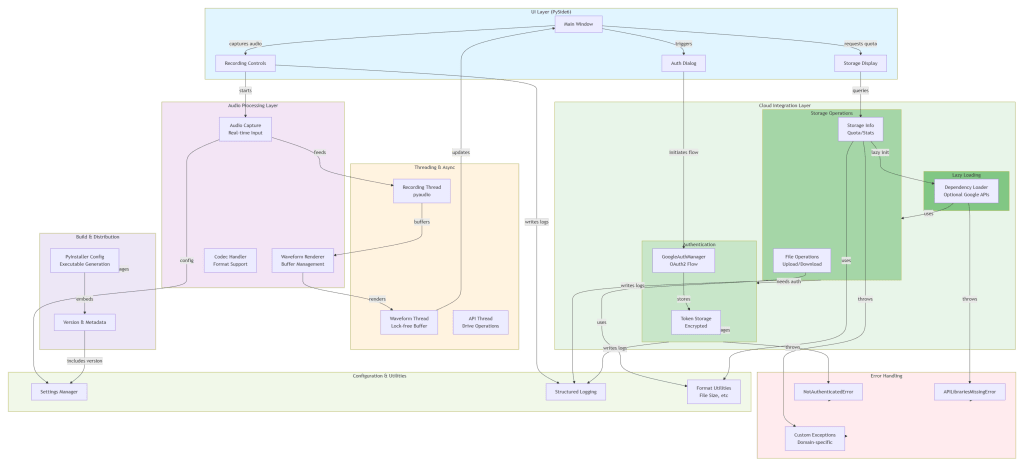
    We extracted GoogleStorageInfo as a standalone component — not for the sake of modularity theater, but because it solved three real problems:

    • Testability: We could mock authentication without mocking the entire Drive client
    • Separation of Concerns: Storage quota logic doesn’t need to know about file upload buffering
    • Reusability: Other modules could query storage without coupling to file operations
    # This is what component separation actually looks like
    class GoogleStorageInfo:
        def __init__(self, auth_manager: Any, service_provider: Any = None):
            self.auth_manager = auth_manager
            self.service_provider = service_provider  # Testability hook
            self.service: Optional[Any] = None
    

    Architect’s Reflection:
    The temptation in minimal builds is to merge everything into one class to “reduce complexity.” The opposite is true: strategic separation reduces accidental complexity. The code is slightly longer, but the responsibility surface is smaller and clearer.

    AI’s Role:
    Copilot surfaced the Protocol abstraction pattern early, which clarified the contract between components without forcing implementation details upward.


    2. Error Handling as Architecture, Not Afterthought

    What Changed:
    Early iterations handled exceptions generically. Once we added Google API versioning concerns and network resilience, generic handling became a liability.

    try:
        self.service = build(
            "drive", "v3", credentials=credentials, cache_discovery=False
        )
    except TypeError:
        # Fallback for older API versions that don't support cache_discovery
        self.service = build("drive", "v3", credentials=credentials)
    

    This isn’t error handling for its own sake — it’s architectural resilience. The Google API library evolved; our code evolved with it.

    The Lesson:
    In production desktop apps, your error handling is part of your UX contract. A cryptic exception crash versus a graceful fallback is the difference between “frustrating” and “professional.”

    Custom Exceptions:

    class NotAuthenticatedError(Exception):
        """Raised when user is not authenticated with Google."""
        pass
    
    class APILibrariesMissingError(Exception):
        """Raised when required Google API libraries are unavailable."""
        pass
    

    These aren’t ceremony — they’re the language your application speaks to its UI layer. When the UI catches NotAuthenticatedError, it knows exactly how to respond. Generic Exception tells it nothing.

    AI’s Contribution:
    Copilot suggested the explicit exception hierarchy and reminded me not to swallow exceptions silently — a junior instinct that even experienced devs sometimes fall into under time pressure.


    3. Lazy Loading and Deferred Initialization: Production Necessity, Not Optimization Luxury

    What Changed:
    Early design initialized Google API clients on app startup. Fast machines didn’t notice the latency. Real user machines with slower networks did.

    def _get_service(self) -> Any:
        """Get or create Google Drive service."""
        if self.service_provider:
            return self.service_provider  # Testing escape hatch
    
        # ... authentication checks ...
    
        if not self.service:
            # Lazy initialization happens here, only when needed
    

    Why It Matters:

    • Cold start time matters for user perception
    • Not every session needs Drive access immediately
    • Tests can inject mock services without triggering real initialization

    Architect’s Perspective:
    This is where “minimal” and “production” intersect. We could have initialized everything upfront (simpler code, measurably worse experience). Instead, we paid a small complexity cost for a noticeable user experience gain.


    4. Cloud Integration: Layering Abstractions Without Over-Engineering

    What Changed:
    The _lazy module emerged as a pattern for handling optional dependencies:

    def has_google_apis_available():
        """Check if Google API libraries are available."""
        # Implementation details here
    
    def import_build():
        """Lazily import the build function."""
        # Only import when actually needed
    

    Why This Matters for Minimal Builds:
    Voice Recorder Pro can function offline. Google Drive integration is a feature, not a core requirement. By deferring the import of heavy Google API libraries, we:

    • Reduce baseline memory footprint
    • Avoid hard dependencies on Google’s libraries
    • Allow graceful degradation if the user doesn’t have them installed

    The Reality Check:
    Some might argue this adds complexity. In a truly minimal build, you’d just import googleapiclient at the top and accept the dependency. But “minimal” that breaks under missing libraries isn’t production-ready — it’s just small.


    5. Logging as Observability, Not Debug Output

    What Changed:

    logger.error("Failed to initialize Drive service - missing libraries: %s", e)
    logger.error("Storage quota error: %s", e)
    

    These aren’t for developers troubleshooting locally. They’re for understanding what happened in a user’s environment after an issue is reported.

    Why It Matters:
    When a user says “I can’t access my recordings in Drive,” you need to know:

    • Was it an authentication failure?
    • A missing library?
    • A network timeout?
    • A quota limit?

    Structured logging gives you that signal. Generic logging gives you noise.

    AI’s Contribution:
    Copilot kept me honest about logging specificity — not logging too much (noise) and not too little (mystery).


    The Expanded AI Partnership Model

    As a Production Readiness Auditor

    Copilot flagged scenarios I’d glossed over: “What if the user has an old version of the Google API library?” That led to the cache_discovery fallback. Not groundbreaking, but the difference between “works on my machine” and “works for most users.”

    As a Pattern Librarian

    When implementing storage quota with percentage calculations and formatted output, Copilot surfaced the distinction between business logic (usedPercent) and presentation logic (format_file_size). Small separation, large clarity.

    As a Dependency Analyst

    “Have you considered what happens if this library isn’t installed?” — forcing the lazy-loading pattern and graceful degradation strategy.


    What “Minimal but Production-Ready” Actually Means

    After this iteration, here’s what we’ve crystallized:

    AspectMinimal ≠But Also ≠Actually Means
    Code VolumeOmit featuresOmit rigorEvery line earns its place
    DependenciesHard-code everythingBloat with abstractionStrategic lazy-loading
    Error HandlingCrash and burnSwallow silentlyInform and recover
    LoggingDebug dumpsNothingActionable signals
    TestingSkip it100% coverageTest failure paths

    The Uncomfortable Truth About Minimal Builds

    Here’s what the original post didn’t quite say: minimal is harder than elaborate.

    Building a 10-feature app with full error recovery is straightforward — you have surface area. Building a 3-feature app that survives all the ways those 3 features can fail? That requires discipline.

    Voice Recorder Pro’s codebase is genuinely small. But every component — from the lazy importer to the custom exceptions to the Protocol abstractions — exists because it solved a real problem. That’s not accidental elegance; it’s architectural intention.


    Closing: The Refinement Loop

    The original post framed this as “Vision + Copilot = Production App.” True, but incomplete.

    The fuller story is: Vision + Implementation Reality + Copilot Collaboration + Relentless Refinement = Production-Grade Minimal Build.

    The refinement loop — where you discover that your “simple” architecture needs strategic complexity, where you realize that error handling isn’t overhead but contract enforcement, where you learn that lazy loading isn’t optimization but user empathy — that’s where AI’s real value emerges.

    Copilot doesn’t replace this loop. It accelerates it, interrogates it, and sometimes redirects it toward patterns you wouldn’t have found in documentation.

    That’s not autopilot. That’s partnership.

  • Learning by Doing: a Minimal Sentiment Classifier

    Learning by Doing: a Minimal Sentiment Classifier

    Tutorial · Post-mortem

    Published · Tags: nlp transformers tutorial post-mortem

    TL;DR

    • I built a compact sentiment-classifier project (training + predict) as a short learning exercise using Hugging Face Transformers, Datasets, and PyTorch.
    • This post documents what we built, why, the errors we hit, how we fixed them, and a frank critique of the project with immediate next steps.

    Motivation

    We wanted a concise, reproducible exercise to practice fine-tuning transformer models and to document the common pitfalls newcomers (and sometimes veterans) face when building ML tooling. The goals were simple:

    • Build a tiny pipeline that trains a binary sentiment classifier on IMDB (or a tiny sampled subset) and saves a best model.
    • Make it easy to reproduce locally (Windows, small GPU), run smoke tests, and share learnings in a short blog post.

    This repo is deliberately small and opinionated — it’s a learning artifact, not production ready. The value is in the problems encountered and how they were solved.

    What we built

    • train.py — config-driven training script using Transformers.Trainer.
    • predict.py — loads the saved best model and predicts a single text.
    • config.yaml / dev_config.yaml — runtime configs; dev_config.yaml is minimized for fast smoke runs.
    • tests/test_smoke.py — tiny pytest forward-pass test using from_config() models (no downloads required).
    • .gitignore and project-level docs (this post).

    Design decisions

    • Use configs (YAML) for hyperparameters so we can run fast dev experiments and larger runs without code edits.
    • Keep training code simple and readable rather than abstracted into many modules — easier for a small learning project.

    Repro (quick)

    Dev smoke run (PowerShell)
    & "D:/Sentiment Classifier/.venv/Scripts/python.exe" "D:/Sentiment Classifier/sentiment-classifier/train.py" "D:/Sentiment Classifier/sentiment-classifier/dev_config.yaml"
    Run tests
    cd "D:/Sentiment Classifier"
    & ".venv/Scripts/python.exe" -m pytest -q

    What went wrong (real problems encountered)

    1. Missing evaluation dependency: evaluate expected scikit-learn for some metrics. Result: metrics import errors.
    2. Transformers API mismatch: different versions of TrainingArguments expect evaluation_strategy vs eval_strategy — passing the wrong kwarg crashed construction.
    3. Save/eval strategy mismatch: load_best_model_at_end=True throws a ValueError unless save_strategy equals the evaluation strategy.
    4. Deprecated Trainer argument: older Trainer usages set tokenizer= directly; docs recommend processing_class + data_collator=DataCollatorWithPadding(tokenizer).
    5. YAML parsing quirks: bare no/yes become booleans; this broke a save_strategy field in dev configs.
    6. Gigantic model files accidentally committed: pushing failed due to large results/ artifacts.

    How we fixed them

    1. Install missing packages (scikit-learn) so evaluate metrics work.
    2. Add robust code in train.py to detect whether TrainingArguments.__init__ accepts evaluation_strategy or eval_strategy and pass the correct kwarg accordingly.
    3. When load_best_model_at_end is true, programmatically align save_strategy with the chosen evaluation strategy.
    4. Replace deprecated tokenizer= usage with processing_class=tokenizer and DataCollatorWithPadding.
    5. Make small config values explicit strings (e.g., save_strategy: "no") to avoid YAML boolean parsing.
    6. Remove large artifacts from git history: untrack results/, add .gitignore, create a backup branch, then filter history and force-push the cleaned repo.

    Aggressive critique (honest, sharp)

    • Storing model artifacts in the repo — use Git LFS or object storage + download script.
    • Monolithic train.py — split into data/model/training/utils; add unit tests.
    • Weak config validation — enforce schema via Pydantic/JSON Schema; add --validate-config.
    • Sparse logging/handling — add structured logs and guards around external calls.
    • Minimal CI — GH Actions for pytest + lint (black/isort/flake8).
    • No model packaging/versioning — add a tiny registry step + manifest.
    • Security/privacy omitted — data intake checklist; pinned/ scanned dependencies.

    Lessons learned

    • Small smoke tests catch integration regressions fast.
    • Prefer small dev configs; run full experiments separately.
    • Transformer APIs evolve; add lightweight compatibility layers (or pin).
    • Never commit large model artifacts to a Git repo.
    • YAML quirks are real — validate configs.

    Immediate next steps

    1. Add Git LFS or cloud storage for models.
    2. Add GitHub Actions for CI (pytest + linting).
    3. Refactor train.py into modules with unit tests.
    4. Add config validation and a contributor README.

    Appendix — exact commands used (select)

    Setup & deps
    # create venv (if needed)
    python -m venv .venv
    & ".venv/Scripts/pip.exe" install -r requirements.txt
    Dev smoke run
    & ".venv/Scripts/python.exe" "train.py" "dev_config.yaml"
    Run tests
    & ".venv/Scripts/python.exe" -m pytest -q
    Clean git history
    git rm -r --cached results
    git add .gitignore
    git commit -m "chore: remove model artifacts from repo (keep locally) and respect .gitignore"
    git branch backup-with-results
    git filter-branch --force --index-filter 'git rm -r --cached --ignore-unmatch results' --prune-empty --tag-name-filter cat -- --all
    git reflog expire --expire=now --all; git gc --prune=now --aggressive
    git push origin --force main

    Credits: Neils Haldane-Lutterodt — project owner and experimenter.

    Want a shorter, social-ready summary? Tell me your audience and tone.

  • Advanced Techniques in Prompt Engineering

    Advanced Techniques in Prompt Engineering

    Update so that:

    Principles Techniques Explorer Future


    Prompt Engineering for Developers

    An interactive guide based on the “Prompt Engineering for Enhanced Software Development” report. Explore core principles, advanced techniques, and compare leading AI models and services to elevate your software-development workflow.

    Core Principles

    These are the foundations of effective communication with any large language model for software tasks. Each card shows a principle and its explanation.

    Clarity & Specificity

    Avoid ambiguity. Instead of “make code,” specify the language, features, libraries, and desired behavior. Vague prompts lead to generic or incorrect outputs.

    Context Provision

    Give the model background info: the project, existing code, your expertise level, and the “why” behind the task. This helps tailor the response to your needs.

    Few-Shot Prompting

    Provide examples of the input-output format you want. This guides the model toward a specific style or structure, yielding more accurate results.

    Iterative Refinement

    Prompting is a process. Test, evaluate, and refine your prompts. Adjust details based on initial outputs to converge on optimal results.

    Define Output Format

    Explicitly ask for JSON, Markdown, a bulleted list, a specific code style, or a particular tone. This ensures the model returns exactly what you need.

    Assign a Persona

    Tell the model to act as an expert in a specific role—like “expert Python developer” or “senior security analyst”— to get more specialized and accurate answers.


    Advanced Techniques

    Unlock more powerful and nuanced responses from LLMs by applying these advanced prompting strategies.

    Chain-of-Thought (CoT)

    Ask the model to “think step by step.” This breaks down complex problems, leading to more accurate results—especially for logic and debugging tasks.

    Retrieval Augmented Generation (RAG)

    Provide external, up-to-date information (like your project’s docs or code snippets) directly in the prompt, grounding the answers in relevant facts and avoiding hallucinations.

    Self-Consistency

    Generate multiple reasoning paths for the same problem, then choose the most frequent or consistent answer. This validates complex algorithms and reduces errors.

    Zero-Shot Prompting

    Ask a question without examples. This tests the model’s raw knowledge—ideal for straightforward or general tasks.

    Promptware Engineering

    Treat prompts like software: define requirements, design, implement, test, and version them. This makes prompts robust, reliable, and maintainable.

    Splitting Complex Tasks

    Break large requests into smaller, sequential prompts—for example, ask for basic app structure first, then add features one by one. This improves clarity and reduces model confusion.


    Model & Service Explorer

    Compare the prompting features of popular local LLMs and cloud services in one place. Below are two static tables (no JS required) showing context windows, prompt formats, strengths, and limitations.

    ⚙️ Local Models

    Name Context Format
    deepseek-r1 4K–32K+ Plain text, <<…>>
    llama2 4K <>…
    mixtral 32K <s>…</s>
    dolphin-mixtral/3 16K–64K+ ChatML

    Strengths & Weaknesses

    • deepseek-r1: Strong reasoning, math, complex problem solving; struggles with few-shot.
    • llama2: Good general coding, strong for SQL with Code Llama; smaller context window.
    • mixtral: Very strong coding & math, efficient SMoE architecture; base model lacks moderation.
    • dolphin-mixtral/3: Highly customizable, strong for coding and agent tasks; uncensored—requires user guardrails.

    ☁️ AI Services

    Name Context Format
    ChatGPT (GPT-4o) 128K+ API/Chat
    GitHub Copilot Chat 8K+ IDE Integration
    GitHub Copilot Agent Large Task Context IDE Integration
    Gemini 1.5 Pro 1M+ API/Chat
    Blackbox AI Varies IDE Integration

    Strengths & Weaknesses

    • ChatGPT (GPT-4o): Excellent all-arounder, strong reasoning, versatile; knowledge cutoff, possible hallucinations.
    • Copilot Chat: Deep IDE integration, context-aware of open files; output quality depends on surrounding code.
    • Copilot Agent: Autonomous multi-file changes, bug fixes from a single prompt; still in beta, requires very clear goals.
    • Gemini 1.5 Pro: Massive context window (processes whole codebases), strong reasoning, Google Cloud integration; can struggle to find “needle in a haystack.”
    • Blackbox AI: Quick code generation, right-click “Fix” & “Optimize” features; opaque logic, cloud-only privacy concerns, can generate faulty code.

    Challenges & The Path Forward

    Visually connect current obstacles in prompt engineering with emerging trends to understand where the field is headed.

    Current Challenges

    Ambiguity

    Natural language is imprecise. Vague prompts lead to incorrect or generic code.

    Complexity

    Models can lose track during multi-step tasks without careful guidance (e.g., using Chain-of-Thought).

    Consistency

    Getting the same style and quality repeatedly can be difficult due to model stochasticity.

    Hallucinations

    Models can invent plausible but incorrect code or API calls that don’t exist.

    Security & Privacy

    Sending proprietary code to cloud services is a risk. Prompts themselves can be targeted by attackers.

    Future Trends

    Automated Prompt Engineering

    Using LLMs to generate and optimize prompts for other LLMs, reducing manual effort and improving accuracy.

    Prompt-Centric IDEs

    Future tools will include features specifically for writing, testing, and debugging prompts within your IDE.

    Advanced RAG Techniques

    Improved methods to retrieve and feed relevant information from entire codebases into prompts, boosting accuracy.

    Improved Self-Correction

    Models will get better at critiquing and fixing their own code based on requirements, reducing manual review.

    Prompt Version Control

    Treat prompts as versioned artifacts in the SDLC—just like source code—to manage changes over time.


    Interactive application based on the “Prompt Engineering for Enhanced Software Development” report.

    This was as interactive as I understood to make it. I will update this in the future.

  • Tailoring Prompts: Best Styles for Different Personalities

    Tailoring Prompts: Best Styles for Different Personalities

    In the age of AI, prompt engineering has become a vital skill. Crafting effective prompts can unlock the full potential of large language models (LLMs). Yet, not everyone interacts with these models in the same way. Different personalities respond better to different prompt styles. This blog post explores how to tailor prompts to suit various types of people.

    Understanding Personality Types

    Before diving into prompt styles, it’s essential to consider the diverse range of personalities. While broad generalizations, we can categorize people into a few key groups:

    • Analytical Thinkers: Detail-oriented and logical, they prefer precise and structured prompts.
    • Creative Visionaries: Imaginative and big-picture oriented, they respond well to open-ended and imaginative prompts.
    • Pragmatic Doers: Focused on efficiency and results, they favor straightforward and task-oriented prompts.
    • Social Collaborators: Enjoy interactive and conversational exchanges, benefiting from dialogue-style prompts.

    Prompt Styles for Analytical Thinkers

    Analytical thinkers value precision and clarity. Here are some effective prompt styles:

    • Structured Prompts: These prompts should include specific instructions, defined steps, and clear output formats. Using numbered lists or bullet points can greatly enhance clarity.
    • Technical Jargon: Don’t shy away from technical terms and industry-specific language. Analytical thinkers appreciate precise vocabulary.
    • Detailed Examples: Provide clear, concrete examples to illustrate what you want the LLM to do. This helps ensure the model understands the specific requirements.

    Example: “Provide a Python function that takes a list of numbers and returns the median. Include type hints and docstrings. Here is an example input: [1, 2, 3, 4, 5]. Expected output: 3.”

    Prompt Styles for Creative Visionaries

    Creative visionaries thrive on open-endedness and imagination. Try these prompt styles:

    • Open-Ended Prompts: Start with broad, imaginative prompts that encourage exploration and brainstorming. Avoid overly restrictive instructions.
    • Metaphors and Analogies: Using creative language, metaphors, and analogies can stimulate imaginative responses.
    • Scenario-Based Prompts: Presenting scenarios and asking for creative solutions or narratives can engage their visionary thinking.

    Example: “Imagine a future where robots manage all aspects of daily life. Describe a typical day in this future. What are the positive and negative implications?”

    Prompt Styles for Pragmatic Doers

    Pragmatic doers prioritize efficiency and getting things done. The best prompt styles are:

    • Direct and Task-Oriented: Get straight to the point. Clearly state the task and desired outcome.
    • Step-by-Step Instructions: Provide concise, actionable instructions. Break down complex tasks into simple steps.
    • Goal-Oriented Prompts: Focus on the end goal or deliverable. What needs to be achieved?

    Example: “Summarize this document in three bullet points: [paste document text]. Also, provide a list of action items derived from the document.”

    Prompt Styles for Social Collaborators

    Social collaborators enjoy interaction and conversation. Here are some effective prompt styles:

    • Conversational Prompts: Frame prompts as part of a dialogue. Use questions and follow-ups to encourage interaction.
    • Role-Playing: Assigning roles to the LLM can make the interaction feel more engaging and collaborative.
    • Iterative Prompts: Build on previous responses and engage in a back-and-forth conversation.

    Example: “Let’s brainstorm ideas for a new marketing campaign. I’ll start with a concept: [share a concept]. What are your initial thoughts? What improvements or variations can you suggest?”

    Table of Prompt Styles by Personality Type

    To summarize, here’s a quick table highlighting the best prompt styles for different personality types.

    Personality TypeBest Prompt Styles
    Analytical ThinkersStructured prompts, Technical jargon, Detailed examples
    Creative VisionariesOpen-ended prompts, Metaphors and analogies, Scenario-based prompts
    Pragmatic DoersDirect and task-oriented prompts, Step-by-step instructions, Goal-oriented prompts
    Social CollaboratorsConversational prompts, Role-playing, Iterative prompts

    Conclusion

    Understanding the nuances of different personality types can significantly improve your prompt engineering skills. Tailor your prompts to match how people think and communicate. This way, you can unlock more effective and productive interactions with large language models. Whether you’re working with analytical thinkers, you adjust your prompt style for better outcomes. If you work with creative visionaries, you do the same. You also adapt your style for pragmatic doers or social collaborators.

    As AI becomes more integrated into our lives, mastering this personalized approach to prompt engineering will be increasingly valuable. Take the time to understand your audience. Tailor your prompts accordingly for optimal results. This will ensure seamless communication with LLMs.

  • The AI Apocalypse (and How to Avoid Becoming a Bug)

    The AI Apocalypse (and How to Avoid Becoming a Bug)

    Alright, folks, gather ’round! Your friendly architect (that’s me) is here to tell you a story. A story of flashing lights, whirring robots, and that sinking feeling you get when your to-do list is suddenly full of tasks only a sentient microwave could understand. Yes, I’m talking about AI.

    Welcome to the Future, Where Your Job Description is Whatever You Tell the Robots It Is

    Now, I’ve been kicking around the software world for… well, let’s just say longer than some of these newfangled AI tools have been alive. I’ve seen technologies come and go faster than free pizza at a startup launch. But this AI thing? This feels different. It’s like we’ve gone from building simple Lego castles to suddenly having the entire toy store thrown at us.

    And honestly? I’m thrilled! But also, a tiny bit terrified. Not “run screaming from the building” terrified, but more like “did I leave the stove on… and is it now trying to write Python?” terrified.

    For years, I’ve been hacking away in the non-profit trenches, where “doing more with less” wasn’t just a catchy phrase, it was a survival tactic. I learned to automate, optimize, and basically squeeze every ounce of efficiency out of whatever code I could get my hands on. Turns out, that was pretty good training for the AI age.

    So, What’s the Deal with All These Robots Writing Our Code Now?

    Here’s the thing: AI isn’t going to replace you. At least, not yet. But it is going to replace the version of you that refuses to learn how to work with it. Think of it like this: if you’re still using a stone tablet to track your tasks, you’re going to struggle when everyone else is rocking a fancy AI assistant.

    The world is changing, and faster than we can drink a cup of cold coffee. It’s becoming a “create your own job” scenario, in a weirdly wonderful way. Now, I’m not saying we’ll all be inventing job titles on the fly (though, “AI Whisperer” does sound pretty cool). What I am saying is that we’ll need to be proactive, adaptive, and downright curious.

    Tips from Uncle Bob on Not Becoming Obsolete

    Now, I’m no guru, but I’ve picked up a few tricks along the way. Here’s my “Survival Guide to the AI Revolution”:

    1. Embrace the Weird

    Don’t be afraid of these AI tools. They’re not sentient overlords (yet), they’re just really sophisticated helpers. Experiment with them. Break them. Laugh when they give you a response that’s clearly been written by a confused squirrel. That’s how you learn.

    2. Become a Prompt Engineer (Without the Actual Engineering Degree)

    Seriously, folks, knowing how to talk to these AI agents is the new superpower. It’s like ordering coffee: you need to be specific! “Give me a code snippet” is like saying “I’ll have a drink.” You need to say “Give me a Python function that filters a list of even numbers, and please make it look pretty!” That clarity is gold.

    3. Understand the Limitations (They’re Not Magic)

    These AI models are smart, but they’re not all-knowing. They can give you great code snippets, but they can also make hilarious (and sometimes dangerous) mistakes. Always, always review what they give you. Treat them like a junior developer who’s still learning the ropes (but writes code a million times faster).

    4. Learn, Learn, Learn (It’s Easier Than You Think)

    The best part? Learning this stuff is easier than ever. There are so many free resources online. YouTube, blogs, tutorials… the information is out there! You don’t need fancy courses or expensive certifications. Just start playing around and digging into the stuff that interests you.

    5. Don’t Panic!

    Seriously. It’s easy to get overwhelmed, but remember: we’re all in this together. The technology is evolving, and so are we. If you don’t have all the tools right now, that’s okay. You have the most important tool of all: your brain.

    The Future is Bright (and Slightly Buggy)

    The AI revolution isn’t something to fear. It’s an opportunity. An opportunity to automate the boring stuff, to unleash our creativity, and to build software that we never thought possible. Sure, there will be hiccups. There will be bugs. There will be moments when you wonder if you should just go live in a cabin and churn butter. But stick with it. Learn, experiment, and laugh at the robots when they mess up.

    And remember, if all else fails, you can always just tell the AI to write a blog post about how awesome you are. It’ll probably do a pretty good job!

    Stay curious, stay flexible, and remember: even in the age of AI, coffee still tastes best when it’s brewed by a human.